


Best Router Placement for Strong WiFi in Every Room
By: Vincent Totino
Read Time: 12 min.
August 27, 2026
Slow Internet got you down? Nothing’s more frustrating than trying to stream your favorite shows or hop on a video call with spotty service. While you might blame it on your Internet provider, your WiFi router's placement could impact performance.
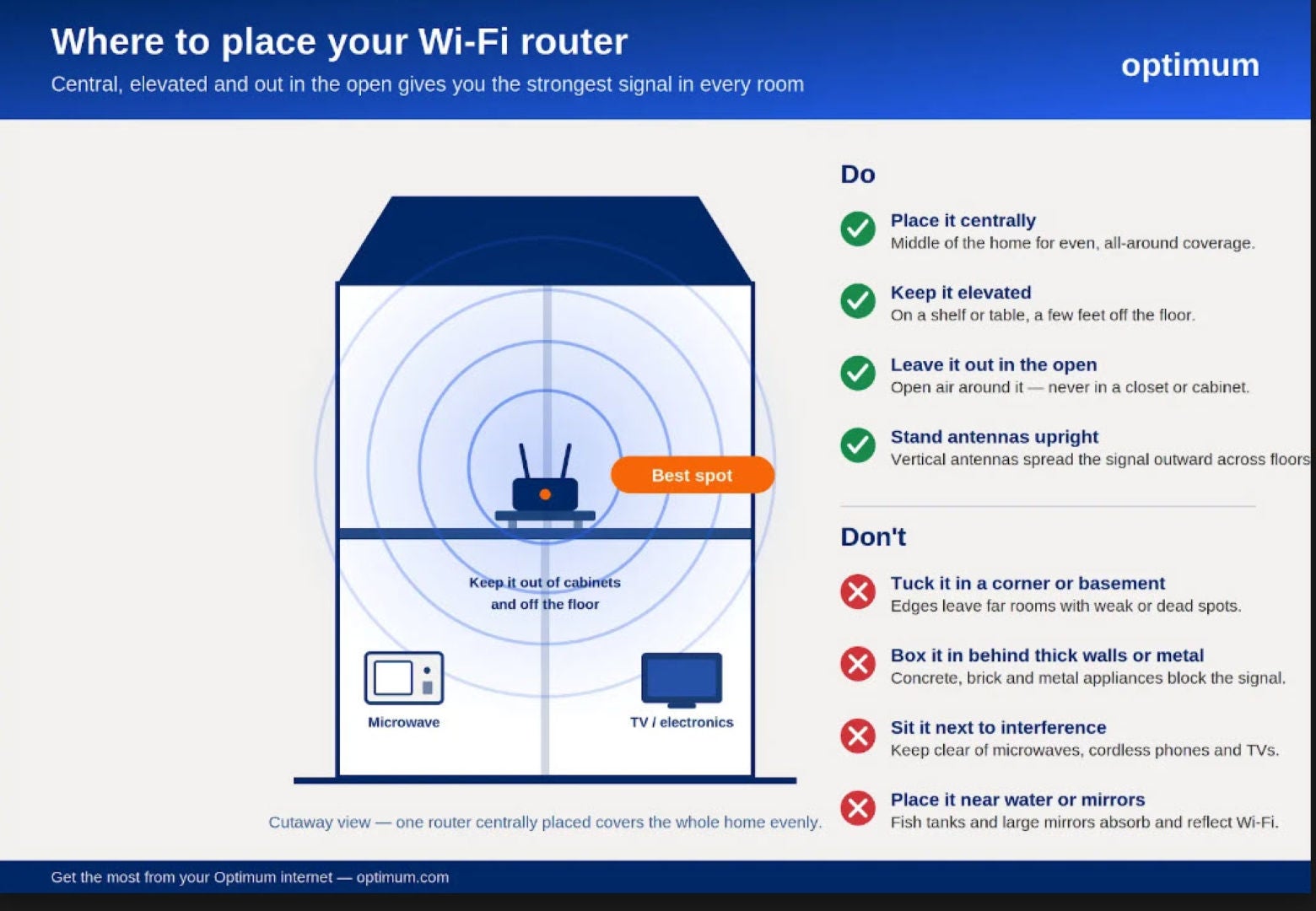
For the best router placement, put your router in a central location, elevated 5–7 feet off the floor, and away from walls, metal objects, and appliances. A central, elevated spot lets the signal radiate evenly in all directions, while a poor location—like a cabinet, basement, or corner—can cut your speed by 50% or more.
Getting your router placement right can feel like a game of digital hide-and-seek, but when you win, you win big, blazing-fast WiFi throughout your house. That’s what we’re covering here today, with the ultimate guide to getting the best router placement to achieve the best signal strength.
Let’s be honest: we all struggle to find that sweet spot. You might try one location only to find your connection is still sluggish in certain rooms. This guide is so important because you don’t have to feel like you’re losing an epic game of Internet connection limbo.
Why does wireless router placement matter?
First, why is finding the best router placement crucial to maximizing your home network’s potential? Wireless routers emit radio waves, and these waves, like ripples in a pond, spread outward from their source. Your devices pick up these signals, and, voila–Internet magic happens, all without the tangled mess of ethernet cables.
But obstacles love to mess with these signals. Thick walls, large furniture, and even appliances can all weaken those waves, causing poor wireless signals. The impact can be significant: poor router location can reduce your speed by up to 50% or more, turning your high-speed Internet connection into a frustrating experience.
Strategic router placement aims to minimize these interferences by placing the router in a spot where its signals can reach your devices with minimal disruption. It’s about giving those signals a clear path so they can do their thing effectively.
It’s about understanding your home’s layout and those sneaky obstacles and then using that knowledge to position your router like a grandmaster strategist.
Understanding Wi-Fi signals
Before diving into placement strategies, it’s essential to understand how Wi-Fi signals work. Wi-Fi routers broadcast signals in a dome-like pattern, spreading both outward and downward from the source. These signals operate on two main frequencies:
- 2.4 GHz: Offers better range but slower speeds; better at penetrating walls
- 5 GHz: Provides faster speeds but shorter range; more susceptible to physical obstacles
Modern Wi-Fi routers use both frequencies simultaneously, allowing your electronic devices to automatically choose the best connection based on their location and capabilities. This dual-band technology makes proper placement an even more critical consideration when it comes to improving weaker signals and achieving optimal performance.
Crucial factors for best router placement
When approaching it strategically, finding the best router placement for your WiFi router is a lot easier. To help make sure you don’t miss any critical steps in the process, follow this simple breakdown:
Location is key: Embracing the center stage
Placing your router on the edge of your home is like staging a concert in a parking lot. You’ll catch some of the music, but it’ll be a subpar experience, right? A centrally located router is like having that same concert right in the middle of your home–that’s the sweet spot we want.
A central location ensures those signal waves can radiate outward evenly, giving more of your devices a front-row seat to the Internet action. If your living room and office are on opposite ends of your house, setting up your router somewhere in the middle will allow one person to stream movies and shows from the couch while the other is on a video call.
Having your router in a central location will provide the best wireless coverage for all your devices.
Pro Tip: Map out your home’s most-used Internet spots and find the central point between them. This might not be the geometric center of your home but rather the central point of your Internet usage.
Elevate the router to amplify the signal
Think about radio antennas. Have you ever wondered why they’re up so high? It’s about getting those radio signals as high up as possible for the broadest, strongest transmission, just like we’re doing with your router (despite router antennas no longer being a design element of most consumer routers).
It's a good idea to avoid placing your router beneath furniture or hiding it in a cabinet. An elevated position ensures better coverage by minimizing obstructions. You’re trying to find a clear path so a strong signal can flow throughout your space. Here are some optimal mounting heights:
- Single-story home: 5-7 feet from the floor
- Multi-story home: Central floor, roughly at ceiling height of the lower floor
- Open concept space: 6-8 feet high, away from corners
Identifying interference: Beware the signal blockers
Mirrors, metal, large appliances, and even appliances that emit electromagnetic waves, like microwave ovens, can wreak havoc on your Wi-Fi coverage, often causing slower speeds or dropped connections. Minimize interference by positioning the router as far as possible from:
- Cordless phones, especially older models
- Bluetooth devices
- Baby monitors
- Large metal objects or appliances
- Mirrors
- Fish tanks (yes, seriously)
- Smart home hubs
- LED bulbs
- Holiday light
- Garage door openers
Fish tanks? It’s true. Think of it this way, the thicker and denser a material, the harder it is for those Wi-Fi waves to pass through. Water is particularly good at absorbing Wi-Fi signals, so aquariums can be a surprising interference source.
By understanding potential culprits of interference, you can pick a placement where your signal can thrive, not just survive.
Antenna manipulation
If your router happens to have them, antenna placement matters too. The best placement for the antenna to strengthen WiFi coverage depends on your home design and room layout. Use these guidelines for optimal antenna positioning:
- Single-story home: Both antennas vertical for maximum horizontal coverage
- Multi-story home: One antenna vertical, one horizontal
- Large open spaces: 45-degree angles can provide better overall coverage but also experiment with placement to find the strongest signal
- Multiple devices on different floors: Alternate angles to optimize coverage
But here’s a fun fact: Experiment with antenna positioning, there is no one-size-fits-all approach here. Even the slightest adjustments can impact Wi-Fi signal strength, and depending on your home's unique characteristics, trial and error can lead to some exciting results.
Advanced tips: Fine-tuning your home Wi-Fi network
Ready to take your wireless network to the next level? Once you nail down your basic placement that returns a reliable WiFi connection, these strategies can unlock even more speed and coverage for ultimate Internet domination.
Router reboot: The power of a fresh start
Ever notice your router gets sluggish, just like your laptop or phone? Technology can be fickle, so it needs a good reset now and then. Rebooting helps clear any temporary glitches affecting its performance. A full router reset may only be required to resolve more advanced diagnostic issues.
Embracing Wi-Fi extenders and mesh networks
Even if you have the best router placement, larger homes, multi-story houses, and sprawling layouts can make getting that seamless signal strength across every inch tricky. If you are struggling with Wi-Fi dead zones, then this is where Wi-Fi extenders or mesh routers can become your secret weapon.
When to use mesh network vs a Wi-Fi extender
Both Wi-Fi extenders and mesh networks help improve your connection and mitigate signal weaknesses in areas of your home. Choose a mesh network when you need to amplify the connection in a larger home, and opt for an extender to expand the signal in smaller homes.
- Mesh network advantages:
- Seamless handoff between nodes
- Single network name (SSID)
- Automatic path optimization
- Easy expansion options
- Smart device prioritization
- Wi-Fi extender advantages:
- Affordable
- Mitigates weak coverage without upgrading the setup
- Easy installation
- Mobile ease – swap it out in a new location
- Can be used to extend coverage outdoors
Optimize channel selection
Think of Wi-Fi channels as different highways carrying Internet traffic. Selecting the least congested channels is key for avoiding traffic jams. This strategy can help enhance your wireless network’s speed and stability.
Channel selection tips:
- 2.4 GHz: Use channels 1, 6, or 11
- 5 GHz: Some higher channels (36-165) often have less interference
- Use Wi-Fi analyzer apps and speed tests to find the least congested channels
- Regularly check and adjust channel selection
Router positioning mistakes:Understanding interference
While finding the best router placement takes some planning, understanding the router placement mistakes in multi-story homes or future-proofed setups helps you simplify troubleshooting your home network. Here’s a breakdown of router positioning mistakes to avoid:
| Avoid These Locations | Why? | Impact on Performance |
|---|---|---|
| Enclosed spaces (cabinets, closets) | Limits signal range and blocks transmissions | Up to 50% signal loss |
| Near windows | Signals can escape through glass | 20-30% coverage reduction |
| Basements or attics | Too far from usage areas | Inconsistent connectivity |
| Directly on the floor | Limited signal spread | Poor vertical coverage |
| Behind large furniture | Signal blockage | Significant dead zones |
| Near metal objects | Signal reflection and interference | Unpredictable performance |
Troubleshooting common placement issues
Even with optimal placement, you might encounter some common issues. Here’s how to address each of them:
1. Dead zones
- Map your coverage using Wi-Fi analyzer apps
- Consider additional access points, like installing Wi-Fi extenders
- Adjust antenna positions
2. Intermittent connectivity
- Check for interference sources that might block Wi-Fi signals
- Monitor channel congestion to see which devices are connected and potentially bogging down the Wi-Fi speeds
- Verify router firmware is updated
3. Slow speeds
- Test different heights and positions
- Ensure adequate ventilation
- Consider upgrading to at least Wi-Fi 6 technology
Future-proofing your setup
As technology evolves, so should your network setup. Consider these factors for long-term success:
- Leave room for expansion
- Plan for increasing device counts
- Consider upcoming smart home additions
- Keep firmware updated to maintain peak router performance
- Monitor your network's overall performance regularly
Easy solutions to improve Wi-Fi
Attaining the best router placement is crucial for maximizing your wireless network's speed, range, and performance. This ensures you can work, stream, game, and browse seamlessly. Finding this strategic location is an investment that pays dividends by boosting productivity, leisure, and your overall digital lifestyle.
Contact Optimum to discover which high-speed Internet plan and advanced router, like the Optimum Smart Router with Wi-Fi 6 technology, can provide seamless connectivity and exceptional performance tailored to your home’s digital demands. Our experts can help you optimize your setup for the best possible router and experience for your setup, ensuring you get the most out of your Internet connection.
Want faster Wi-Fi? Check out the latest Wi-Fi 6E technology.
Frequently Asked Questions (FAQs) About Router Placement
Does router placement matter?
Yes, router placement is crucial for optimal Wi-Fi performance. Poor router location can reduce your internet speed by up to 50% or more. Routers send out radio waves that spread out like ripples in a pond, but things like thick walls, big furniture, appliances, and even fish tanks can interfere with those signals.
It's important to think about where you put it to reduce interference and get better coverage all around your home.
Does antenna placement on the router matter?
Yes, if your router has adjustable antennas, their positioning can significantly impact your Wi-Fi coverage. Here are some general guidelines:
- For multi-story homes: Position one antenna vertical and one horizontal
- For single-story homes: Keep both antennas vertical for maximum horizontal coverage
- For large open spaces: Set antennas at 45-degree angles for better overall coverage
- For multiple devices on different floors: Alternate antenna angles to optimize coverage
Where should I put a router in a 2-story house?
For a two-story house, the ideal router placement is:
- On the central floor (first floor), mounted near ceiling height, if possible
- In a central location relative to where internet is most used
- Away from interference sources like mirrors, metal objects, and large appliances
- Elevated 5-7 feet from the floor
- Consider using Wi-Fi extenders or mesh networks for complete coverage if needed
Where should I put a router in a 3-story house?
For a three-story house, optimal router placement includes:
- On the middle floor (second floor) in a central location
- Elevated position, preferably at ceiling height of the middle floor
- Away from potential interference sources
- Consider using a mesh network system for consistent coverage across all floors
- If signal strength is still an issue, Wi-Fi extenders can help eliminate dead zones on the top and bottom floors
How do thick walls, furniture, and appliances affect router signal strength, and which blockers should I avoid most?
Thick plaster walls (which contain metal lathe) or brick walls in older homes, heavy furniture and large metal appliances like stoves/ovens and refrigerators create barriers, weakening signal strength and negatively impacting Wi-Fi reliability and speed.
The core Wi-Fi offenders include:
- Metal objects and appliances Refrigerators, metal ductwork, filing cabinets reflect and scatter the Wi-Fi signal. This is called electromagnetic interference.
- Microwaves These appliances share Wi-Fi's frequency; this means the signals battle each other.
- Water sources Beware of fish tanks and walls with heavy plumbing because water absorbs Wi-Fi signals.
- Concrete, brick, or plaster walls Metal lathe and rebar also create electromagnetic interference.
- Mirrors The metal in mirrors also creates interference.
How do I choose the best Wi‑Fi channel to reduce interference from neighbors and devices?
The easiest way to pick a better Wi-Fi channel is to use a free Wi-Fi analyzer app (available for phones or laptops). This app shows you the channels your neighbors' networks use, allowing you to choose a less crowded signal. On the 2.4GHz band, opt for channels 1, 6, or 11 since they don't overlap with each other.
The 5GHz band offers many more channels, which means less competition for the signal. Check to see if your router offers an “auto channel” function; this tells your router to switch channels periodically.
YOU MAY ALSO LIKE

Optimum vs. AT&T: Compare Internet speed, pricing and coverage
- Read Time: 8 min.
- Internet
- October 08, 2026

How Much Internet Speed Do You Need?
- Read Time: 8 min.
- Internet
- October 08, 2026

How to Find The Best Internet Service Providers (ISPs) In Your Area
- Read Time: 6 min..
- Internet
- October 08, 2026